Independent app review · Evidence checked August 31, 2026
Akiflow review 2026: the fast planner for tasks scattered across work apps
Akiflow is built for the person whose real to-do list is split between email, Slack, project tools and memory. It pulls those inputs into one inbox, then makes time blocking fast enough to become a daily habit. The convenience carries one of the highest prices in the ranking.
 Akiflow
Our take
Is it worth using?
Akiflow is a strong fit for busy, desktop-centered professionals who need to consolidate tasks from several work tools and plan them on a calendar. Its speed, integrations and daily ritual are excellent. The official price is $19 per month billed yearly or $34 monthly after seven days free. That is hard to justify for a self-contained personal list.
Inside the apps
What they actually look like
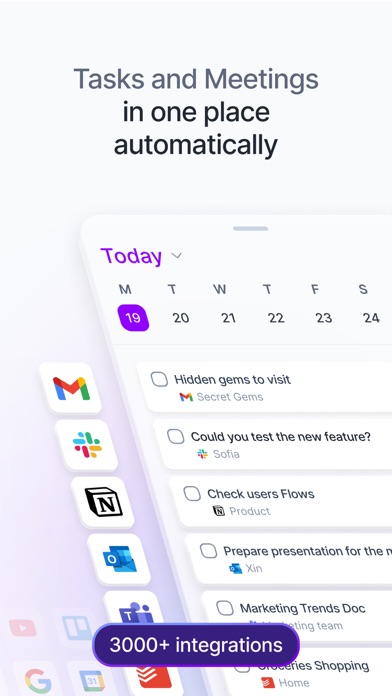
These screenshots come from the apps' current App Store listings. They are not mockups we made for the article.
What users report
What starts to matter after a week
We read recent reviews for Akiflow to look for praise and friction that product pages leave out. They are anecdotes, not a vote, so they challenge our testing rather than decide the verdict.
One reviewer says Akiflow’s inbox finally gathers tasks from Gmail, Slack and voice messages in one place. Another praises the human onboarding support, while an iPad user says the tablet experience still needs work.
The quick version
The differences that matter
- Best for
- Consolidating work tasks into a fast daily plan
- Price
- $19 monthly billed yearly, or $34 billed monthly
- Trial
- 7 days
- Main strength
- Universal inbox, keyboard speed and time blocking
- Main weakness
- High cost and a desktop-first center of gravity
- Best alternative
- Sunsama for guidance; Morgen for calendar breadth
The universal inbox solves a real fragmentation problem
A flagged email, Slack message, project task and spoken reminder can arrive in one place. Processing that queue once is easier than remembering which application contains each promise.
One reviewer says this inbox finally helped them keep up with tasks from Gmail, Slack and voice capture. The feature is most valuable when those sources already exist, not as a reason to create more integrations.
Time blocking is designed to be quick at a keyboard
Tasks can move from inbox to calendar with durations, priorities and shortcuts. The interface rewards people who plan on a computer and want less dragging and modal clicking than a general calendar normally requires.
A fast planner still needs honest durations. Placing everything on the calendar can turn flexibility into a brittle mosaic that has to be repaired after the first interruption.
Human onboarding is a surprisingly important feature
A recent reviewer praises being shown the product by a real person rather than left with an AI chatbot. That matters for software with many connections and a new daily ritual.
Akiflow also promotes an AI assistant and MCP connection, but automation should follow a clear capture rule. Pulling more work into one inbox is not progress if nobody decides what belongs on the day.
The price assumes professional value
The current pricing page lists $34 month to month or $19 per month billed yearly, with a seven-day trial. That is far above Todoist, TickTick and conventional list apps.
The calculation therefore depends on time saved across several paid work tools. If Akiflow replaces daily triage and calendar rearrangement, the price has a case. If the list begins and ends inside one app, it probably does not.
Flaws, but not dealbreakers
The iPad experience is a reported weakness, the small US rating sample limits confidence and a seven-day trial is short for learning a new planning habit. The broad integration layer also creates more places where syncing can fail.
Akiflow remains one of the clearest specialist choices we reviewed. It is not expensive Todoist. It is a fast control layer for work already scattered elsewhere.
Good to know
A few common questions
How much does Akiflow cost?
The official pricing page listed $34 billed monthly or $19 per month billed yearly, with a seven-day free trial.
What apps connect to Akiflow?
Akiflow supports calendar, email, task and collaboration integrations. Check its current integrations page for the exact services and sync direction.
Is Akiflow better than Sunsama?
Akiflow emphasises speed and consolidated capture. Sunsama provides a slower, more guided daily-planning ritual.
Sources
Where we checked the facts
We use the app maker's own pages for prices and features. Reviews and community posts are useful for spotting problems, but one person's experience is still one person's experience.
- 01OfficialAkiflow product pageView source
- 02OfficialAkiflow current pricing and featuresView source
- 03App StoreAkiflow US App Store listing and recent reviewsView source