Independent app review · Evidence checked August 31, 2026
GoodTask review 2026: the Reminders upgrade for power users
GoodTask does not ask you to abandon Apple Reminders. It builds more views, filters and controls on top of the reminders and calendars already in your Apple account. That gives it unusually simple capture and unusually complicated setup at the same time.
 GoodTask
Our take
Is it worth using?
GoodTask is the best option in the ranking for an Apple user who likes Reminders data but wants boards, stronger filters, calendar views and more configurable repeats. It is powerful and private by design, but the interface can feel crowded and the paid boundary appears often. Try Apple Reminders first; choose GoodTask only when you can name what is missing.
Inside the apps
What they actually look like
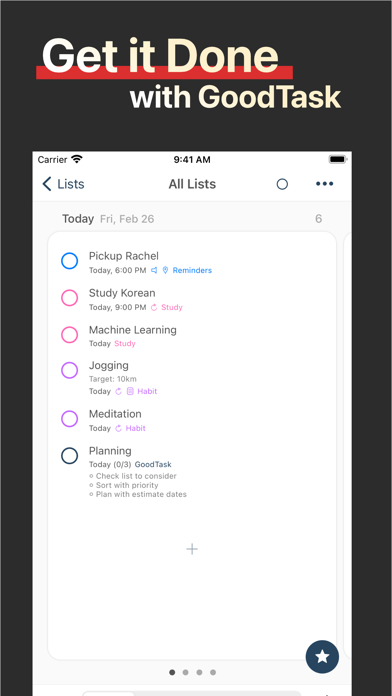
These screenshots come from the apps' current App Store listings. They are not mockups we made for the article.
What users report
What starts to matter after a week
We read recent reviews for GoodTask to look for praise and friction that product pages leave out. They are anecdotes, not a vote, so they challenge our testing rather than decide the verdict.
A recent reviewer used GoodTask to recreate a sprint-style personal workflow and praised the developer for helping them finish the setup. A lower rating says the same power is hidden behind a confusing interface and frequent upgrade prompts.
The quick version
The differences that matter
- Best for
- Apple users who want more control over Reminders data
- Price model
- Free download with paid unlocks
- Main strength
- Power views without migrating away from Reminders
- Main weakness
- A dense interface and frequent upgrade prompts
- Data
- Uses Apple Reminders and Calendar sources
- Best alternative
- Reminders for simplicity; Things 3 for calmer projects
Keeping Apple Reminders underneath is a clever advantage
A task added through Siri or another Apple app can appear in GoodTask because both are looking at the same underlying reminder data. You can keep the capture habit that already works and improve the way the list is reviewed.
This also makes leaving less frightening. The reminders do not belong to a proprietary GoodTask database, although GoodTask-specific views and rules still need to be recreated elsewhere.
Smart Lists and views turn a simple source into a power tool
GoodTask can show reminders as lists, days, weeks, months or boards. Filters and quick actions make it possible to create focused views without changing how every task is stored.
A recent reviewer used that flexibility to recreate a sprint-style personal workflow. They also praised the developer for helping them solve the setup. That is encouraging, and it shows that the setup can require real thought.
Complexity arrives before elegance
The app exposes many controls, colors and modes. It can become exactly the Reminders interface you wanted, but it does not arrive that way for every person.
Another reviewer says the interface is confusing and upgrade prompts appear around too many actions. Power-user software still needs a clear path through its power. GoodTask occasionally asks the user to supply that clarity.
It is a better fit for Apple commitment than Apple curiosity
GoodTask makes most sense when iCloud or Outlook reminders already form the durable center of your system. A Windows or Android workflow weakens the reason to build more layers on top of Apple’s model.
Things 3 is calmer but stores its own tasks and has no collaboration. Todoist works on more platforms but does not share GoodTask’s deep relationship with Reminders.
Flaws, but not dealbreakers
The first hour can feel like configuration, the visual density is high and the free experience may show its limits abruptly. It is also dependent on the strengths and quirks of Apple’s underlying reminder framework.
For the right user, that dependence is the point. GoodTask makes a familiar, portable source much more capable without forcing a migration first.
Good to know
A few common questions
Does GoodTask replace Apple Reminders?
It replaces the interface for many users while continuing to use Apple Reminders and Calendar data underneath.
Is GoodTask private?
Its use of Apple Reminders data means tasks can remain in the Apple account rather than requiring a separate GoodTask task service. Check the current privacy policy for details.
Is GoodTask better than Things 3?
GoodTask is more configurable and works with Reminders data. Things 3 is calmer and easier for private project planning.
Sources
Where we checked the facts
We use the app maker's own pages for prices and features. Reviews and community posts are useful for spotting problems, but one person's experience is still one person's experience.
- 01OfficialGoodTask product pageView source
- 02Project docsGoodTask user guideView source
- 03App StoreGoodTask US App Store listing and recent reviewsView source