Independent app review · Evidence checked August 31, 2026
Morgen review 2026: one calendar for a complicated week
Morgen begins with calendar consolidation. Google, Outlook, iCloud and other accounts can share one view, then tasks from several services can be placed into the remaining time. This is valuable when the week is fragmented, and excessive when one calendar already tells the truth.
 Morgen
Our take
Is it worth using?
Morgen is a strong planner for people who juggle several calendars and task services across Windows, Mac or Linux. It keeps the user more involved than a fully automatic scheduler and offers unusually broad integrations. The official individual price is $15 per month billed yearly or $30 monthly, and the iPhone app remains a companion to the deeper desktop product.
Inside the apps
What they actually look like
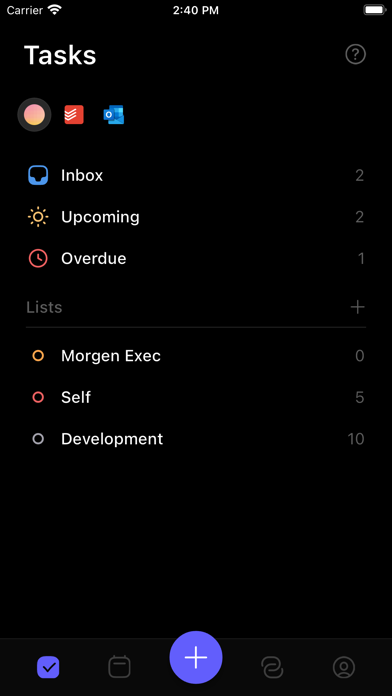
These screenshots come from the apps' current App Store listings. They are not mockups we made for the article.
What users report
What starts to matter after a week
We read recent reviews for Morgen to look for praise and friction that product pages leave out. They are anecdotes, not a vote, so they challenge our testing rather than decide the verdict.
One reviewer likes Morgen’s desktop app but finds the iPhone companion too limited for linked reminders. Another praises its Notion and iCloud calendar connections. The small rating sample makes both stories more useful than the average alone.
The quick version
The differences that matter
- Best for
- Several calendars and task sources in one plan
- Price
- $15 monthly billed yearly, or $30 billed monthly
- Trial
- 14 days with no credit card required
- Main strength
- Broad calendar and task integrations
- Main weakness
- Mobile offers a narrower companion experience
- Best alternative
- Akiflow for capture; Sunsama for ritual; Motion for automation
Calendar consolidation is the practical starting point
A personal iCloud calendar, work Microsoft account and client Google calendar can show the same Tuesday from different angles. Morgen brings those commitments together before asking where tasks might fit.
The benefit is not another calendar design. It is seeing collisions early enough to make a decision instead of discovering them while already late.
Task integrations keep the original systems intact
Morgen connects with services including Todoist, Notion, Linear, ClickUp, Google Tasks and Microsoft To Do. A task can remain in its source while receiving time on the calendar.
This avoids a wholesale migration, but sync direction and completion behavior must be tested. A task copied into two systems is not automatically a task kept consistent in two systems.
The desktop product is substantially more important than mobile
The App Store description explicitly calls mobile a companion with a subset of the desktop features. One reviewer likes the desktop app but says linked Apple Reminders are difficult to inspect or complete on iPhone.
Another praises the Notion and iCloud integrations. Both experiences can be true because the value depends heavily on where the planning happens.
The price buys integration breadth and control
The official page lists $15 per month billed yearly or $30 month to month after a 14-day trial. The same page advertises a 30-day money-back guarantee and discounts for students, academics and non-profits.
Morgen also says calendar data is stored in Switzerland or the EU and is not sold. Privacy claims still deserve reading in full, especially when a service can see several work and personal calendars.
Flaws, but not dealbreakers
The subscription is high for a calendar, mobile capability lags desktop and the US App Store rating sample is small. Integrating many sources also means more permissions and more possible sync edge cases.
Morgen is easiest to recommend when calendar fragmentation is already painful. If one account and one task list cover the week, the product solves a complexity you do not have.
Good to know
A few common questions
How much does Morgen cost?
The individual plan was listed at $15 per month billed yearly or $30 billed monthly, with a 14-day trial.
Does Morgen work with iCloud and Outlook?
The official integration list includes iCloud, Google and Outlook calendars, along with several task services.
Is Morgen better than Motion?
Morgen gives the user more direct calendar control and broader calendar consolidation. Motion focuses more heavily on automatic replanning and a larger AI work suite.
Sources
Where we checked the facts
We use the app maker's own pages for prices and features. Reviews and community posts are useful for spotting problems, but one person's experience is still one person's experience.
- 01OfficialMorgen calendar and planning product pageView source
- 02OfficialMorgen current plans, integrations and privacy summaryView source
- 03App StoreMorgen US App Store listing and recent reviewsView source