Independent app review · Evidence checked August 31, 2026
NotePlan review 2026: the best task manager for people who think in notes?
NotePlan begins with the day’s note rather than a project list. Tasks can sit beside meeting decisions and draft ideas, then reappear in calendar and review views. That feels natural if work starts in writing and backwards if notes are merely attachments to tasks.
 NotePlan
Our take
Is it worth using?
NotePlan is one of the best choices for an Apple user who wants daily notes, calendar planning and tasks in the same system. It keeps actions close to their explanation without requiring a completely build-your-own workspace. Todoist is easier for sharing and reminders; Obsidian is more open-ended; Things 3 is calmer for pure task planning.
Inside the apps
What they actually look like
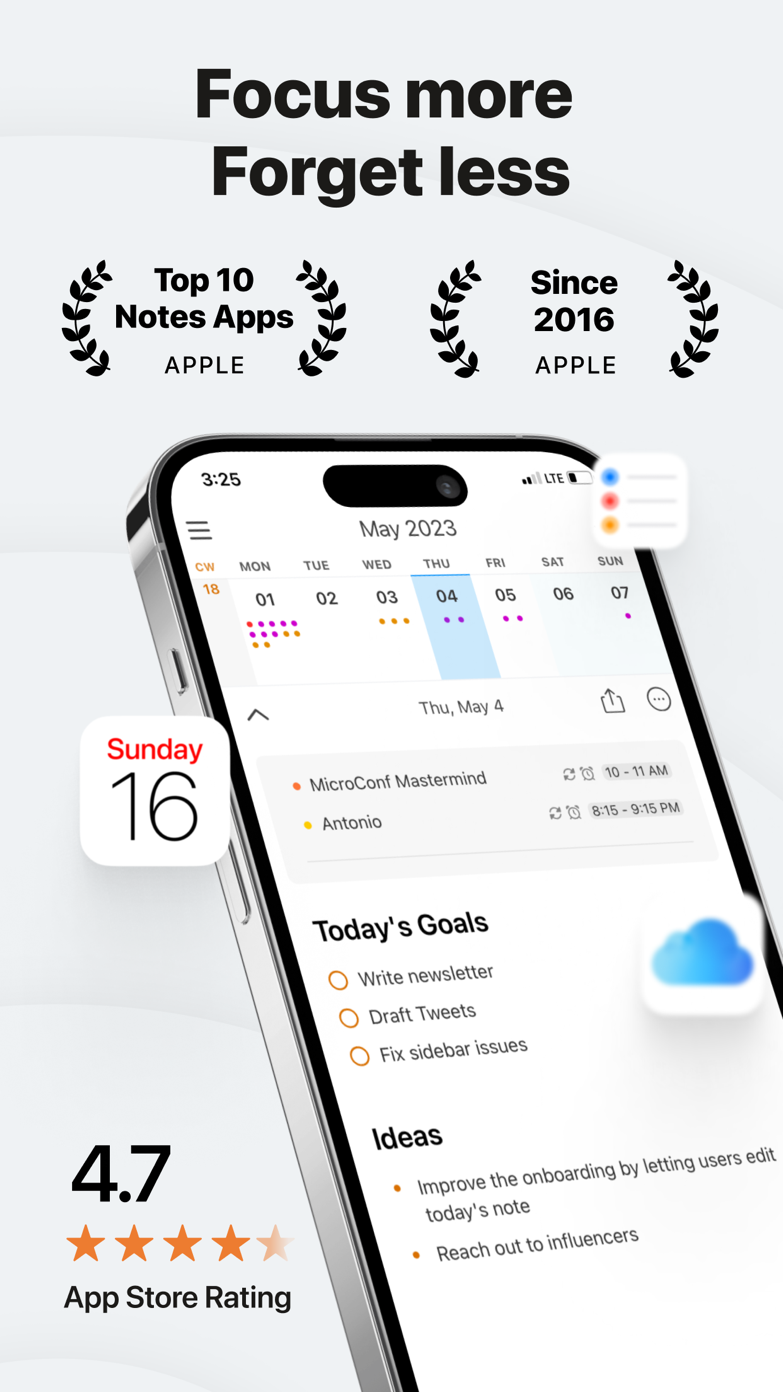
These screenshots come from the apps' current App Store listings. They are not mockups we made for the article.
What users report
What starts to matter after a week
We read recent reviews for NotePlan to look for praise and friction that product pages leave out. They are anecdotes, not a vote, so they challenge our testing rather than decide the verdict.
A reviewer who struggled to start with Notion found NotePlan easier to grow into. A critical review reports trouble canceling a trial.
The quick version
The differences that matter
- Best for
- Tasks that begin inside daily notes and meetings
- Price model
- Free download with a subscription for full use
- Main strength
- Notes, tasks and calendar context stay connected
- Main weakness
- Requires adoption of a notes-first working method
- Platforms
- Designed around Apple devices with web access options
- Best alternative
- Obsidian for flexibility; Things 3 for pure planning
A task makes more sense beside the note that created it
“Follow up with Sam” is a poor task when the reason, decision and promised document live in a meeting note. NotePlan lets the action remain in that note while broader views gather open work from across the system.
This reduces copying and preserves useful history. Months later, the completed action still sits beside the conversation that explains why it mattered.
Daily notes create a natural planning rhythm
The calendar gives each day a page. Tasks, events and notes can meet there without requiring a new project for every short-lived piece of work. Moving an unfinished item forward feels closer to editing a notebook than administering a database.
People who already journal, take meeting notes or plan in writing may find this much easier to sustain than separate task and notes apps.
It is opinionated enough to work without becoming Notion
NotePlan offers links, tags, filters and templates, but the daily-note structure gives those tools a center. You can customize the system without beginning from a blank database.
A reviewer who struggled to start with Notion says NotePlan was easier to grow into. That is a useful distinction. Flexibility matters only after the first useful day is understandable.
Reminders and sharing are not its strongest argument
A dedicated task manager is quicker when a task must alert you at a precise time, be assigned to somebody else or appear on every kind of device. NotePlan is strongest when context is the hard part.
A split system can be sensible: keep research and project actions in NotePlan, and put urgent or shared commitments in Reminders or Todoist. Avoid automating that split until the rule is clear.
Flaws, but not dealbreakers
The subscription is expensive if you use NotePlan as a plain list, and the number of linking and filtering options can invite endless system design. One critical review also reports a poor trial-cancellation experience, which is worth checking before subscribing.
For notes-first work, the value is not a giant feature count. It is opening one place and seeing the meeting, action and available time together.
Good to know
A few common questions
Can NotePlan replace Todoist?
It can for Apple users whose tasks are closely tied to notes. Todoist remains simpler for sharing, quick reminders and mixed platforms.
Is NotePlan like Obsidian?
Both can connect Markdown-style notes and tasks. NotePlan is more opinionated around daily notes and calendars, while Obsidian is a broader build-your-own environment.
Is NotePlan worth the subscription?
It is easier to justify when it replaces both a notes app and a daily task planner. A simple list does not need it.
Sources
Where we checked the facts
We use the app maker's own pages for prices and features. Reviews and community posts are useful for spotting problems, but one person's experience is still one person's experience.
- 01OfficialNotePlan product pageView source
- 02Project docsNotePlan documentationView source
- 03App StoreNotePlan US App Store listing and reviewsView source