Independent app review · Evidence checked August 31, 2026
Obsidian review 2026: should a notes app run your task list?
Obsidian makes the most sense when a task needs the note around it. A checkbox can sit beside meeting context, research or a decision, then appear later through a query. The freedom is real, but so is the work of building a system that a normal task app provides on day one.
 Obsidian
Our take
Is it worth using?
Use Obsidian for tasks that begin inside notes and are easier to understand with their context attached. It is a strong fit for research, writing and personal knowledge work. Do not make it the only home for time-sensitive reminders, shared commitments or anything that must survive a hurried phone capture unless you have already tested the plugins and sync setup you intend to rely on.
Inside the apps
What they actually look like
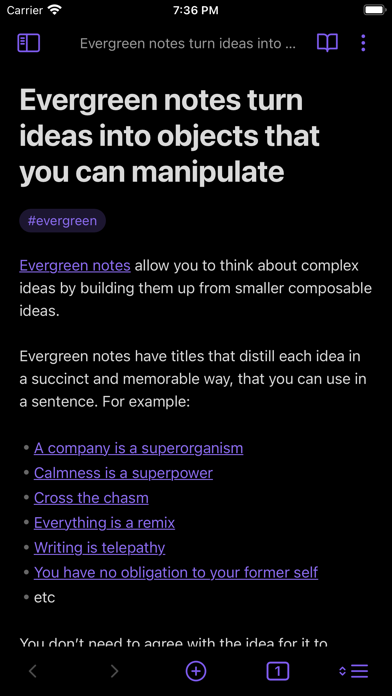
These screenshots come from the apps' current App Store listings. They are not mockups we made for the article.
What users report
What starts to matter after a week
We read recent reviews for Obsidian to look for praise and friction that product pages leave out. They are anecdotes, not a vote, so they challenge our testing rather than decide the verdict.
US reviewers praise the local Markdown files and the freedom to shape Obsidian around their own work. Critical reviews focus on mobile syncing, vault switching and the delay that a large setup can add to quick capture.
The quick version
The differences that matter
- Best for
- Tasks connected to research, meetings and project notes
- Core price
- Free with no sign-up required
- Optional Sync
- $4 monthly when billed annually, or $5 monthly
- Main strength
- Local Markdown files with unusually flexible task queries
- Main weakness
- No ready-made task workflow without setup and plugins
- Best alternative
- NotePlan for more structure; Todoist for reminders and sharing
The reason to use Obsidian is context, not the checkbox
Any notes app can place a checkbox in a document. Obsidian becomes useful when that action stays beside the meeting, source or decision that created it. Returning later does not require reconstructing why the task exists from a six-word title.
That makes it a convincing home for research, writing and long projects. It is less convincing for taking the bins out at seven, sharing a shopping list or capturing a reminder while walking away from a conversation.
The Tasks plugin can gather scattered actions into a real system
Plain Markdown checkboxes are easy to create and difficult to review across hundreds of notes. The widely used Tasks community plugin adds dates, recurrence, filtering and queries that can collect unfinished work from the whole vault.
The result can be more personal than a conventional task manager. It can also become a small software project. Every query, template and plugin is another choice that has to remain understandable when the system has been ignored for a week.
Local files are a genuine advantage, but syncing is still a decision
Obsidian stores ordinary Markdown files locally. The company says the core app is free without limits, requires no account and does not collect telemetry. That is unusually reassuring for a long-lived archive of notes and tasks.
Moving between devices is less automatic. Obsidian Sync currently costs $4 per user each month when billed annually, or $5 monthly. Other file-sync methods can work, but they add their own edge cases. Recent App Store complaints about mobile resyncing are worth taking seriously before trusting urgent tasks to a large vault.
Mobile is capable, but quick capture can still feel heavier
The mobile app supports core plugins, community plugins, the command palette, themes and custom controls. It is much closer to desktop Obsidian than a simple companion viewer.
Capability is not the same as speed. A normal task app opens to an inbox and expects one short line. Obsidian may first ask which note, template or folder should receive the action. That extra decision is small until it happens ten times in a busy day.
Flaws, but not dealbreakers
Obsidian is not a dedicated task manager by default. Reliable reminders, shared lists, a polished Today view and simple recurrence all take more work than they do elsewhere. Plugins can also change or disappear, which makes a heavily customized workflow harder to explain and maintain.
Those costs are reasonable when tasks genuinely belong inside knowledge work. Keep a separate reminder app for commitments with a real time or another person attached, and Obsidian becomes much easier to recommend for everything that needs context.
Good to know
A few common questions
Is Obsidian a to-do list app?
Not by default. It is a notes app with Markdown checkboxes that can become a capable task system through queries and community plugins.
Can Obsidian replace Todoist?
It can replace Todoist for notes-led personal work. Todoist remains simpler for reminders, sharing, fast capture and a ready-made daily workflow.
Does Obsidian support recurring tasks?
The popular Tasks community plugin supports recurring tasks, dates and filtered queries. These are plugin features rather than the core task experience.
Is Obsidian free?
Yes. The core app is free without limits. Obsidian sells optional services including Sync and Publish.
Sources
Where we checked the facts
We use the app maker's own pages for prices and features. Reviews and community posts are useful for spotting problems, but one person's experience is still one person's experience.
- 01OfficialObsidian pricing and data-storage policyView source
- 02OfficialObsidian mobile featuresView source
- 03Project docsObsidian Tasks plugin guideView source
- 04App StoreObsidian US App Store listing and recent reviewsView source