Independent app review · Evidence checked August 31, 2026
OmniFocus review 2026: still worth the learning curve?
OmniFocus is built for a person who has enough active work to need a formal review system. Its depth is reassuring when forty projects are real. It is exhausting when you only wanted somewhere to keep a shopping list and three work tasks.
 OmniFocus
Our take
Is it worth using?
OmniFocus is the strongest specialist in this list for a large, private GTD-style system on Apple devices. Its perspectives, review tools and automation can make a complicated workload navigable. Most people should start with Todoist, Things 3 or Reminders because OmniFocus asks for more setup and maintenance than a modest list can repay.
Inside the apps
What they actually look like
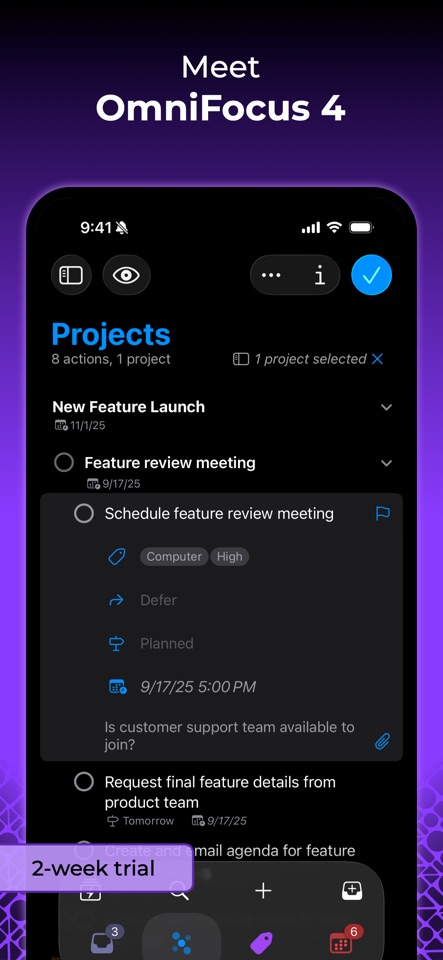
These screenshots come from the apps' current App Store listings. They are not mockups we made for the article.
What users report
What starts to matter after a week
We read recent reviews for OmniFocus to look for praise and friction that product pages leave out. They are anecdotes, not a vote, so they challenge our testing rather than decide the verdict.
A user of more than a decade still calls OmniFocus brilliant, but says reviewing 30 to 40 projects has become tedious. That complaint neatly captures the cost of all that power.
The quick version
The differences that matter
- Best for
- Large personal systems and formal weekly reviews
- Price model
- Free trial with paid subscription and purchase options
- Main strength
- Perspectives, project review and deep automation
- Main weakness
- A steep learning curve and substantial upkeep
- Collaboration
- Not its natural role
- Best alternative
- Things 3 for calm; Todoist for cross-platform sharing
OmniFocus assumes your workload is genuinely complicated
Projects can be sequential, parallel or single-action lists. Tags describe context, status or energy. Perspectives then cut across that system to show exactly the slice you can act on now.
That vocabulary sounds heavy because it is. The payoff appears only when a flat list has already stopped working. If you routinely review dozens of projects, the structure can feel like relief rather than bureaucracy.
The review feature is more important than the inbox
Many apps are good at capture. OmniFocus is unusually serious about what happens weeks later. Projects can return for review on their own schedules, so neglected work is surfaced before it quietly becomes irrelevant.
A user of more than a decade still describes the app as brilliant, but says reviewing 30 to 40 projects has become tedious. That is a fair summary of the bargain: OmniFocus can expose complexity, but it cannot make the complexity disappear.
Perspectives can show the right list instead of the whole database
A useful perspective might show available work tagged “office,” due within a week and belonging to active projects. That is more precise than a generic Today screen and much easier to trust once the rules are stable.
Building those views takes time. New users can get trapped designing a perfect taxonomy before they have completed a week of ordinary tasks. Start with the inbox, projects and review. Add custom perspectives only when a repeated question cannot be answered simply.
Apple automation is a real advantage
OmniFocus works well with shortcuts, scripts and keyboard-heavy capture. For somebody who enjoys shaping a personal system, this is not cosmetic flexibility. It can remove repetitive sorting and open exactly the view needed for a place or routine.
That power also narrows the audience. A household list, mixed Windows team or casual shared project belongs somewhere else. OmniFocus is best understood as private professional infrastructure, not a universal to-do app.
Flaws, but not dealbreakers
The interface exposes concepts that simpler apps hide, and the cost is difficult to justify if you use only an inbox and Today view. Mobile capture is useful, but administration is still more comfortable on a larger screen.
For the right user, none of that is accidental bloat. It is the machinery that keeps a genuinely large system reviewable. Everyone else should enjoy the permission to choose less.
Good to know
A few common questions
Is OmniFocus only for GTD?
No, but its project, context and review model is particularly well suited to GTD-style personal systems.
Is OmniFocus worth the price?
It can be for people managing many active projects who use perspectives, reviews and automation. A simple personal list will not justify the cost or upkeep.
Does OmniFocus support teams?
It is primarily a personal task manager. Choose Todoist or a team project tool if collaboration is central.
Sources
Where we checked the facts
We use the app maker's own pages for prices and features. Reviews and community posts are useful for spotting problems, but one person's experience is still one person's experience.
- 01OfficialOmniFocus product pageView source
- 02Project docsOmniFocus support and documentationView source
- 03App StoreOmniFocus 4 US App Store listing and reviewsView source