Independent app review · Evidence checked August 31, 2026
Sunsama review 2026: a thoughtful daily ritual at a serious price
Sunsama does not promise to store every possible task more cleverly. It asks you to pull in today’s work, estimate it, place it around meetings and stop when the day is full. That guided restraint is valuable, but the subscription costs far more than a normal list.
 Sunsama
Our take
Is it worth using?
Sunsama is one of the best deliberate daily planners for professionals whose tasks are scattered across calendars and work tools. The planning ritual can prevent an impossible day before it begins. It is expensive, has no free-forever plan and treats mobile as a companion to desktop. Try the full 14-day trial before paying.
Inside the apps
What they actually look like
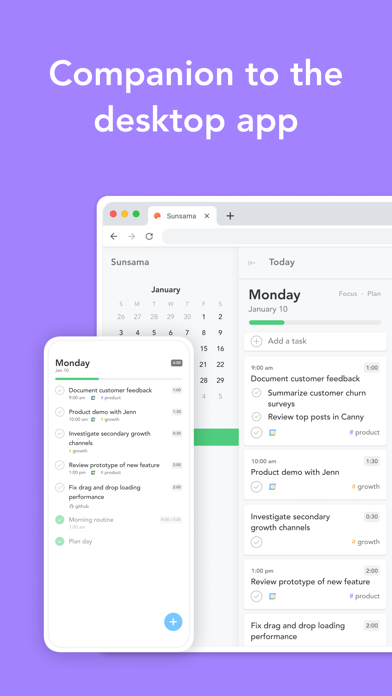
These screenshots come from the apps' current App Store listings. They are not mockups we made for the article.
What users report
What starts to matter after a week
We read recent reviews for Sunsama to look for praise and friction that product pages leave out. They are anecdotes, not a vote, so they challenge our testing rather than decide the verdict.
A user of several years says Sunsama’s simple daily list and task movement are still worth paying for. Recent lower ratings report crashes and object to the service’s policy for inactive workspaces.
The quick version
The differences that matter
- Best for
- A guided daily planning ritual across work tools
- Current displayed price
- $17 monthly billed yearly, or $22 monthly
- Trial
- 14 days with no credit card required
- Main strength
- Encourages realistic capacity and shutdown
- Main weakness
- A high price and desktop-centered workflow
- Best alternative
- Akiflow for speed; TickTick for lower-cost breadth
Planning the day is a short ceremony, not a blank calendar
Sunsama walks through open work, asks what belongs today and encourages a duration estimate before the task enters the calendar. The day stops accepting work when the hours are already spoken for.
That guided friction is the product. A faster app lets you add a twelfth task. Sunsama is trying to make the twelfth task feel visibly unreasonable.
Integrations reduce copying without replacing every source
Tasks can be pulled from tools such as Todoist, Asana, Trello, Notion, Gmail and Slack, then planned beside Google or Outlook calendars. The original system can remain the record while Sunsama becomes the daily cockpit.
This is useful only if processing the combined inbox is quicker than checking each source. A small, self-contained personal list does not need an integration hub.
The mobile app is deliberately a companion
The App Store description says the first day must be planned from desktop and calls mobile a companion rather than a standalone replacement. The phone is for checking the plan, adding a task and making smaller changes away from the desk.
That is honest positioning, but it rules out people who organize most of life from a phone. Test the actual device split, not the idea of having apps everywhere.
The price needs to buy a habit, not merely features
The top of Sunsama’s current pricing page shows $17 per month billed yearly or $22 billed monthly, after a 14-day trial. A lower FAQ on the same page still mentions older $20 and $25 figures, so confirm the checkout amount.
A long-time reviewer says the simple daily list and ability to move work are why they keep paying. That is the right test. If the planning ritual changes the workday, the subscription may be worth it. If you skip the ritual, it becomes an expensive calendar skin.
Flaws, but not dealbreakers
There is no free-forever plan, the mobile app is secondary and recent low ratings mention crashes and concern about inactive workspace deletion. People should understand cancellation and data-retention rules before committing.
Sunsama remains distinctive because it sells a calmer planning behavior rather than an endless feature race. The no-card trial is long enough to learn whether that behavior survives a real week.
Good to know
A few common questions
How much does Sunsama cost?
The pricing page displayed $17 per month billed yearly or $22 billed monthly when checked. Confirm the amount at checkout because another section of the page still contained older figures.
Does Sunsama have a free plan?
No free-forever plan is advertised. It offers a 14-day trial without requiring a credit card.
Can Sunsama replace Todoist?
It can hold tasks, but its main role is daily planning across several sources. Many users keep Todoist or another tool as the underlying task database.
Sources
Where we checked the facts
We use the app maker's own pages for prices and features. Reviews and community posts are useful for spotting problems, but one person's experience is still one person's experience.
- 01OfficialSunsama product pageView source
- 02OfficialSunsama pricing and trial termsView source
- 03App StoreSunsama US App Store listing and recent reviewsView source