Independent app review · Evidence checked August 31, 2026
Superlist review 2026: a beautiful shared list that still feels young
Superlist lets a list gather tasks, paragraphs, links, files and other people without immediately turning into project-management software. It is one of the most inviting apps here, but several ordinary task controls still feel less settled than the design.
 Superlist
Our take
Is it worth using?
Superlist is a good fit for people who want collaborative lists with room for notes and context. It is pleasant for trips, launches and household projects that are more than checkboxes but less than formal team work. Todoist is safer for mature task controls; Notion is deeper for documents; Reminders is simpler for a free household list.
Inside the apps
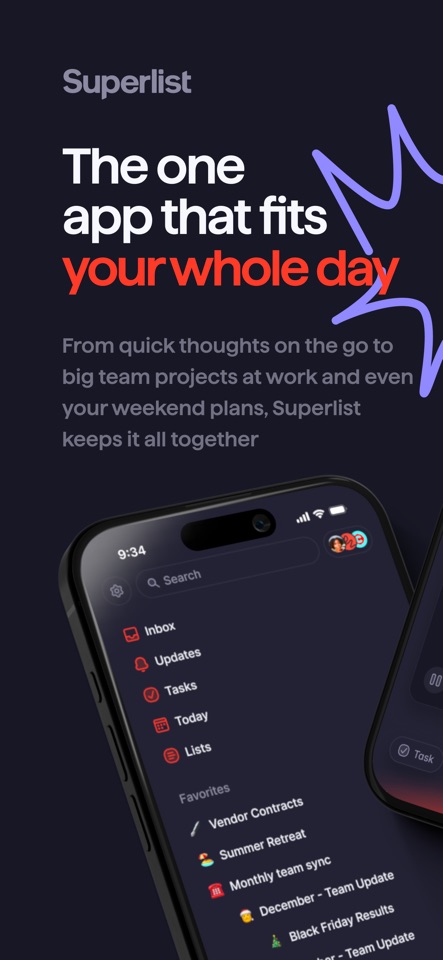
What they actually look like
These screenshots come from the apps' current App Store listings. They are not mockups we made for the article.
What users report
What starts to matter after a week
We read recent reviews for Superlist to look for praise and friction that product pages leave out. They are anecdotes, not a vote, so they challenge our testing rather than decide the verdict.
One recent reviewer calls Superlist their favorite list app but still wants priorities. Another likes the product and thinks Pro costs too much.
The quick version
The differences that matter
- Best for
- Shared lists that mix tasks, notes and links
- Price model
- Free download with an optional Pro plan
- Main strength
- A fluid, attractive format for lightweight collaboration
- Main weakness
- Priorities and deeper controls still feel incomplete
- Collaboration
- A central part of the product
- Best alternative
- Todoist for tasks; Notion for structured documents
A list can hold more than a stack of checkboxes
A trip starts with bookings and tasks, then acquires addresses, notes, links and questions from another person. Superlist can keep those objects in one readable place without asking you to design a database.
That flexibility is its clearest advantage over a conventional task manager. The page remains a list, but it has enough room for the information that makes the tasks understandable.
The interface makes collaboration feel lighter
Inviting another person, assigning an item and adding context feels less formal than opening a team project tool. That makes Superlist appealing for small groups that would reject a heavier workspace.
The visual polish helps people want to return. It does not solve the social problem of unclear ownership, but it removes much of the software ceremony around a shared list.
Basic task controls need to be judged separately from design
One recent reviewer calls Superlist a favorite but still wants priorities. Another likes the product and thinks Pro costs too much. Those complaints matter because they concern ordinary daily use, not obscure power features.
A new product can feel finished in screenshots before its behavior feels finished over a month. Test repeats, reminders, sorting and the way unfinished work returns before moving an important system into it.
It occupies a useful middle ground
Todoist is a stronger task manager. Notion is a stronger database and document system. Apple Reminders is a simpler free list. Superlist’s opportunity is the pleasant space between them.
Choose it when the list needs prose and people, but not reporting, dependencies or a custom workflow. That sounds narrow until you count how many real projects are holidays, launches, events and household plans.
Flaws, but not dealbreakers
The product still feels young, some task controls are less mature than Todoist’s and the paid value can be difficult to see for a solo user. An attractive interface also makes it tempting to forgive missing behavior you would notice immediately elsewhere.
Superlist is worth trying because it has a coherent point of view, not because it has the longest feature list. Keep a copy of critical information until the app has earned your trust.
Good to know
A few common questions
Is Superlist free?
It has a free offering and an optional Pro plan. Check the current product page for limits and regional pricing.
Is Superlist better than Todoist?
Superlist is better for lists that mix tasks with notes and rich context. Todoist has more mature task controls, filters and integrations.
Can Superlist replace Notion?
For a lightweight shared list, perhaps. It is not a replacement for Notion’s databases, documents and broad workspace tools.
Sources
Where we checked the facts
We use the app maker's own pages for prices and features. Reviews and community posts are useful for spotting problems, but one person's experience is still one person's experience.
- 01OfficialSuperlist product pageView source
- 02App StoreSuperlist US App Store listingView source
- 03App StoreRecent Superlist US App Store reviewsView source