Apple task apps compared · Evidence checked August 31, 2026
Things 3 vs Apple Reminders: what are you actually paying for?
Apple Reminders is free and already on your phone. Things 3 costs money on each Apple platform. We used both to find out what the paid app actually gives you.
 Things 3
 Apple Reminders
Our take
Which one should you pick?
Try Apple Reminders first. It is better for Siri, location alerts and lists you share with a household. Buy Things 3 if you plan several personal projects and want a much better Today view, clearer start dates and less clutter. Things is nicer for planning; Reminders is more useful when another person or a location is involved.
Inside the apps
What they actually look like
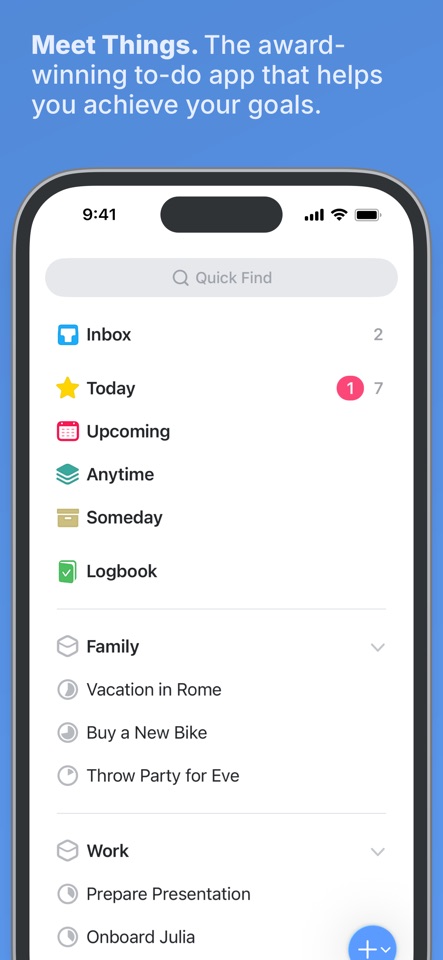
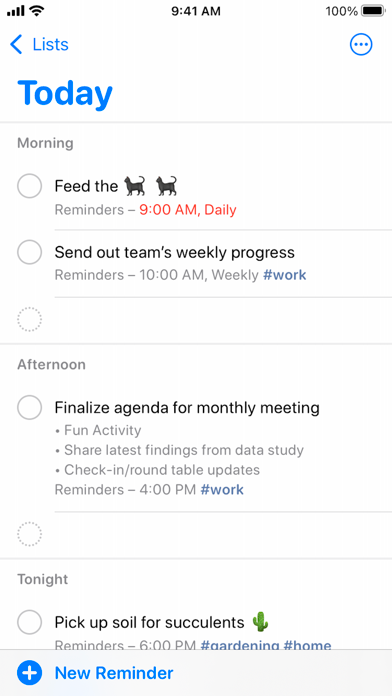
These screenshots come from the apps' current App Store listings. They are not mockups we made for the article.
The quick version
The differences that matter
- Better daily planning
- Things 3
- Better voice and location capture
- Apple Reminders
- Sharing and household lists
- Apple Reminders
- Projects and start dates
- Things 3
- Lowest cost
- Apple Reminders
- Windows or Android
- Neither
Both are quick to add to. Planning is where they separate.
Both apps let you save a task in seconds. The difference shows up when you come back to plan. Things sorts work into Inbox, Anytime, Someday and Today, so future tasks stay out of the way until you want them. Reminders is more direct: put something on a list, give it a date or place, and wait for Apple to bring it back.
Things is easier to scan when a personal project has several steps. Reminders is better for “tell me when I get home” and for a grocery list that needs to appear on two phones without asking anybody to install a new app.
What the Things 3 price pays for
Things does not have the longest feature list. What you are paying for is a very good Today view, clear headings and a useful difference between the day you want to start something and the day it is actually due.
Reminders has gained tags, Smart Lists, sections, templates and automatically grouped groceries. It becomes clumsy sooner when you review lots of projects, but it is already installed, works with Siri and costs nothing.
Skip Things 3 if you share lists
Do not buy Things because the screenshots look calm. It has no proper collaboration, browser version, Windows app or Android app, and the iPhone, iPad and Mac versions are separate purchases. If somebody else needs the list, Reminders is usually the better Apple option.
Things is not merely a prettier Reminders, though. If you review several personal projects every morning, its cleaner planning views can save a surprising amount of fiddling.
Good to know
A few common questions
Is Things 3 better than Apple Reminders?
For structured personal planning, usually yes. For voice capture, location reminders, sharing and price, Apple Reminders is better.
Can Things 3 share lists with family?
No. Things 3 is a personal task manager. Apple Reminders supports shared lists and is the better household choice.
Should I try Reminders before buying Things 3?
Yes. If tags, Smart Lists, sections and Siri already cover your system, Things may add polish rather than a necessary capability.
Sources
Where we checked the facts
We use the app maker's own pages for prices and features. Reviews and community posts are useful for spotting problems, but one person's experience is still one person's experience.
- 01OfficialGetting Things: Things SupportView source
- 02OfficialGet started with Reminders on iPhoneView source
- 03CommunityThings 3 vs Apple Reminders discussionView source