App review · Version evidence checked August 31, 2026
Things 3 review 2026: still the best-designed Apple task app?
Things 3 does fewer jobs than Todoist or TickTick, but the jobs it keeps are exceptionally well done. Its beautiful interface gets the attention; the Today view and date model are the better reasons to buy it.
 Things 3
Our take
Is it worth using?
Things 3 is our favorite personal task manager for somebody who uses only Apple devices and never needs to share a project. It is fast, calm and sold as a one-time purchase on each platform. Do not buy it if you need Windows, Android, a browser app or collaboration.
Inside the apps
What they actually look like
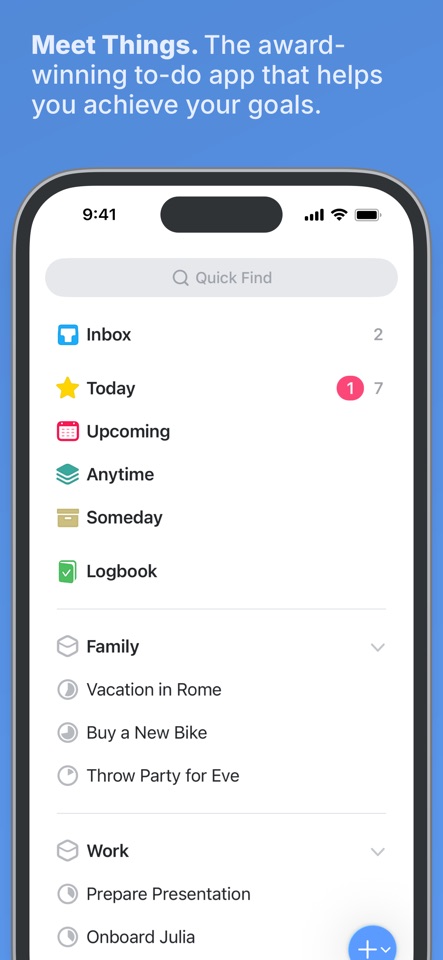
These screenshots come from the apps' current App Store listings. They are not mockups we made for the article.
What users report
What starts to matter after a week
We read recent reviews for Things 3 to look for praise and friction that product pages leave out. They are anecdotes, not a vote, so they challenge our testing rather than decide the verdict.
One reviewer says they have used Things every day for five years. Critical reviews mostly complain about the learning curve, no web app and having to buy each platform separately.
The quick version
The differences that matter
- Best for
- Calm Apple-only personal planning
- Price model
- Separate one-time purchase per Apple platform
- Main strength
- An excellent Today view and clear projects
- Main weakness
- No collaboration, web, Windows or Android
- Best free alternative
- Apple Reminders
- Best cross-platform alternative
- Todoist
The Today view is the real reason to buy it
Things does not fill Today with everything that happens to be due. You choose what belongs there, group it under headings and move lower-priority work to This Evening.
The difference between a start date and a deadline also helps. At the end of a messy day, you can move planned work without pretending every task missed a hard deadline.
Its missing features are not small omissions
Things has no shared projects. It is Apple-only, has no browser app and is sold separately on iPhone, iPad and Mac. These are not small gaps.
If those limits do not affect you, the native feel, keyboard support and visual consistency are excellent. If they do, the design cannot make up for an app you cannot access or share.
Capture is quick once you learn how Things thinks
Quick Entry on the Mac and the share sheet on iPhone make it easy to save a task without leaving what you are doing. The inbox then holds the thought until you decide whether it belongs in Today, a project or nowhere at all.
Things does not interpret a loose sentence as aggressively as Todoist. You will tap into dates and projects more often. That feels slower during capture, but the result is predictable and the detail sheet stays pleasantly uncluttered.
Apple Reminders is now good enough to try first
Reminders now includes tags, Smart Lists, sections, templates, shared lists and deep Siri support for free. Things has to earn its price through better day-to-day planning, not a basic feature checklist.
If you mostly capture errands, start with Reminders. If you sit down each morning to review several personal projects, Things makes that routine noticeably nicer.
Flaws, but not dealbreakers
Buying the iPhone, iPad and Mac versions separately makes the real price less obvious. There is also no collaboration, browser access or non-Apple escape hatch. Those limits should rule Things out before its design talks you into it.
Inside an all-Apple personal workflow, the restraint is a strength. Things does not chase every planning fashion, and its slower release rhythm has kept the basic model coherent. Just make sure you are buying the app it is, not waiting for it to become a team tool.
Good to know
A few common questions
Is Things 3 worth it in 2026?
Yes for Apple-only personal planning if Today, projects and one-time ownership matter. No for collaboration or mixed platforms.
Does Things 3 require a subscription?
No. It uses separate one-time purchases for its Apple-platform apps.
Can Things 3 share lists?
No. Things 3 is designed as a personal task manager.
Sources
Where we checked the facts
We use the app maker's own pages for prices and features. Reviews and community posts are useful for spotting problems, but one person's experience is still one person's experience.
- 01OfficialGetting Things: Things SupportView source
- 02App StoreThings 3 US App Store listing and reviewsView source
- 03CommunityThings 3 vs Apple Reminders discussionView source