App review · Version evidence checked August 31, 2026
Todoist review 2026: is it still the best to-do app for most people?
Todoist is popular for a good reason: adding a task is quick, the app is easy to understand and it works almost everywhere. The main question is how soon you will want the paid planning features.
 Todoist
Our take
Is it worth using?
Todoist is still our general pick for somebody who wants one task list across several devices. It is quick, its projects stay readable and shared lists are easy to introduce to other people. Apple-only users may prefer Things 3 or Reminders, while anyone who plans heavily on a calendar should also try TickTick.
Inside the apps
What they actually look like
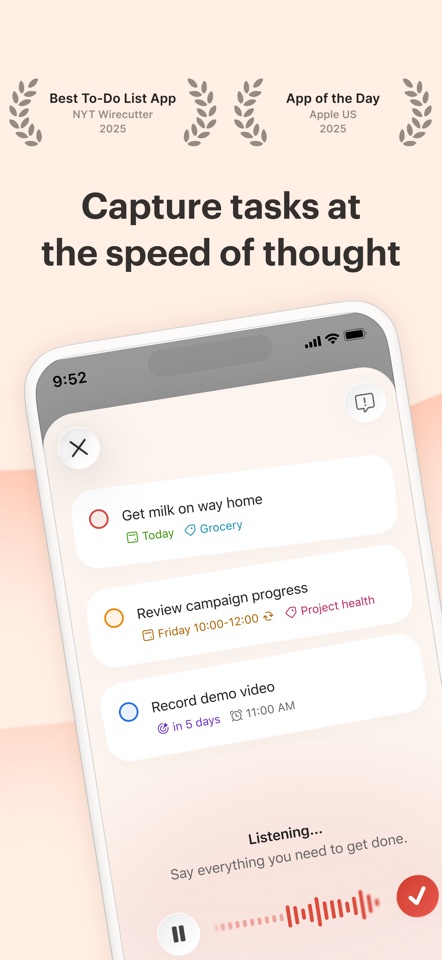
These screenshots come from the apps' current App Store listings. They are not mockups we made for the article.
What users report
What starts to matter after a week
We read recent reviews for Todoist to look for praise and friction that product pages leave out. They are anecdotes, not a vote, so they challenge our testing rather than decide the verdict.
Recent US reviews often praise how quickly Todoist gets out of the way. Lower ratings mention widget bugs, missing tasks and features that feel excessive for a personal list.
The quick version
The differences that matter
- Best for
- Fast capture, mixed devices, shared projects
- Free plan
- Useful, with five personal projects
- Pro price
- $60/year or $7 monthly in the US
- Main strength
- Natural-language capture without much ceremony
- Main weakness
- The paid boundary reaches common planning features
- Best alternative
- TickTick for calendar and focus; Things 3 for Apple-only calm
Adding a task is still Todoist’s best feature
A task often occurs to you at a bad moment: between messages, while walking somewhere or just before the thought disappears. Todoist lets one loose sentence contain the task, date, time, project and priority.
The same entry style works on mobile, desktop and the web. You do not have to remember a different method when you change devices.
It stays understandable as your list grows
Projects, labels, sections and filters add depth, but a new user can ignore most of them. A grocery list and a multi-stage work project can sit in the same account without forcing you to manage them in the same way.
The downside is that custom filters can become a hobby. A large backlog can also turn Today into a wall of work. Todoist can organize what you add, but it cannot tell you which tasks should not be there.
The free plan is useful, but the best planning tools cost money
Todoist Free is enough to learn the app properly and keep a modest personal system. You can capture tasks, use dates, divide work into projects and share a small list without treating the trial period like a race.
Pro becomes easier to justify when reminders, calendar layout, deadlines or a larger set of projects solve a problem you already have. The value case is much weaker if you are paying only to keep an uncomplicated list in a nicer-looking app.
Flaws, but not dealbreakers
Todoist sometimes rewards over-organization. Labels, priorities and filters are useful, but it is easy to spend twenty minutes refining a view that saves two minutes later. The app also cannot rescue a Today list built from unrealistic due dates.
Several features that make Todoist feel complete belong to Pro. We would rather see a clearer boundary around specialist tools, but the free version is not a hollow demo and the core capture experience remains unusually good.
Who should skip Todoist
TickTick is better if you want calendar planning, habits and a focus timer in the same app. Things 3 is nicer for one person planning on Apple devices. Apple Reminders covers many household lists for free.
Pro is worth it when you regularly use its calendar layout, deadlines or custom reminders. It is not worth paying for simply because Todoist appears at the top of many lists.
Good to know
A few common questions
Is Todoist free?
Yes. The current free plan supports five personal projects and the core task experience. Several planning and reminder features belong to Pro.
Is Todoist Pro worth it?
For people using calendar layout, deadlines, custom reminders or a larger project system, often yes. Light personal lists can remain on free.
What is Todoist’s biggest weakness?
Several useful planning features require Pro, and a large backlog can still make the Today view feel overwhelming.
Sources
Where we checked the facts
We use the app maker's own pages for prices and features. Reviews and community posts are useful for spotting problems, but one person's experience is still one person's experience.
- 01OfficialTodoist plans, pricing, and billing FAQView source
- 02App StoreTodoist US App Store listing and reviewsView source
- 03IndependentThe 7 best to do list apps in 2026View source