App review · App Store evidence checked August 31, 2026
Apple Reminders review 2026: the best free to-do app for iPhone?
Apple Reminders used to feel like a place to jot down errands. It now has sections, tags, Smart Lists, templates and shared lists, while keeping the Siri and location features that third-party apps struggle to match.
 Apple Reminders
Our take
Is it worth using?
Reminders is the free task app most iPhone users should try first. It covers personal errands, recurring tasks and shared household lists without a new account. Move to Todoist, Things 3 or TickTick only when a specific limitation keeps getting in your way, usually larger project reviews, non-Apple access or calendar planning.
Inside the apps
What they actually look like
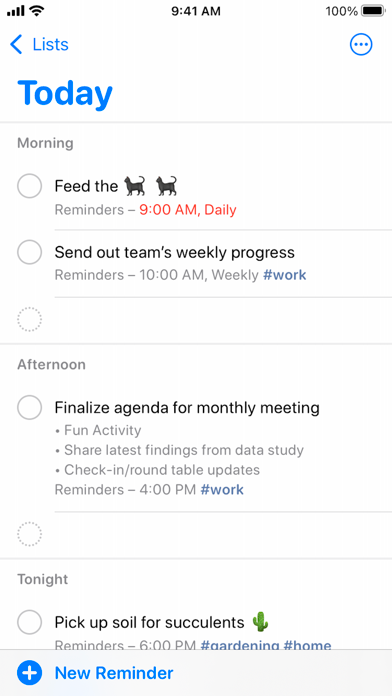
These screenshots come from the apps' current App Store listings. They are not mockups we made for the article.
What users report
What starts to matter after a week
We read recent reviews for Apple Reminders to look for praise and friction that product pages leave out. They are anecdotes, not a vote, so they challenge our testing rather than decide the verdict.
The linked walkthrough makes a simple case for Reminders: it is already on the phone, works with Siri and can be shared without asking the whole household to install something new.
The quick version
The differences that matter
- Best for
- Apple households, voice capture and everyday lists
- Price
- Included with Apple devices
- Main strength
- System-level Siri, location and sharing integration
- Main weakness
- Large project review and mixed-platform access
- Best planning alternative
- Things 3
- Best cross-platform alternative
- Todoist
Siri and location reminders are still its best features
You can add to Reminders through Siri, locations, Messages and shared Apple lists without thinking about opening a productivity app first.
That matters in the car park, kitchen and hallway. Those are exactly the places where many ordinary reminders occur and are forgotten.
It can handle much more than a shopping list now
Tags and Smart Lists can gather tasks from several lists. Sections and columns give a project more shape. Templates make repeated lists quicker, and grocery lists can group items automatically.
That is enough organization for many people, with no upgrade screen. It still becomes fussy when you review several large projects, and Windows or Android users are poorly served.
Sharing works best when everybody is already using Apple devices
A shared groceries or household list is easy to understand because the app is already present and the invitation uses an Apple account people may already have. Nobody needs to compare plans or learn a new workspace.
The convenience ends at the edge of Apple’s ecosystem. Web access is limited and Android is not a realistic part of the workflow. A mixed-device household should start with Microsoft To Do, Todoist or another genuinely cross-platform option.
Do not switch just because another app looks more serious
A paid app does not make your list more serious. Things 3 has better personal planning, Todoist works on more platforms and TickTick adds calendar and focus tools. Buy one only if you need that difference.
If Reminders is quick to add to and brings back the right task at the right time, there is no prize for replacing it.
Flaws, but not dealbreakers
Reminders can feel awkward when a project contains dozens of actions. Smart Lists are powerful, but they are not as comfortable to review as Todoist filters or Things projects. Changes across Apple’s yearly software releases can also move familiar controls around.
For errands, recurring responsibilities and family lists, those weaknesses rarely outweigh the speed of Siri and location alerts. We would move only after the same limitation interrupts a real week more than once.
Good to know
A few common questions
Is Apple Reminders good enough as a main to-do app?
Yes for most everyday personal and household use. Large projects and mixed-device workflows are its clearest limits.
Is Apple Reminders free?
It is included with Apple devices and an Apple account.
What is better than Apple Reminders?
Things 3 is better for Apple-only planning, Todoist for cross-platform projects, and TickTick for calendar-led all-in-one planning.
Sources
Where we checked the facts
We use the app maker's own pages for prices and features. Reviews and community posts are useful for spotting problems, but one person's experience is still one person's experience.
- 01OfficialGet started with Reminders on iPhoneView source
- 02App StoreApple Reminders US App Store listingView source
- 03CommunityApple Reminders as a main productivity appView source